Turing’s Computing Machinery and Intelligence and Searle’s Minds, Brains, and Programs

A key part of Turing’s argument is that the perception of the interrogator (who is analogous to any of us) is all that he/we have to determine whether or not the machine is “thinking”, by the test of whether or not it is possible to distinguish a machine from a person. This is a kind of solipsism. If I am the perceiver, I have no way of knowing if anybody else even exists or is a figment of my imagination. (Descartes – I think therefore I am, etc. does anybody else think? We’ll never really know). So even in observing a very human like person there is no way to know if they are really ‘thinking’ or just operating by a program.

Obviously we assume that we can project our own mental experiences on other humans, being so much like them, and in fact as mentioned by Searle, we even tend to project them onto inanimate objects, which he says contributes to the three main reasons why people expect that programing a thinking machine is possible, and why AI exists as it does: the reasons being that

1- we associate both mental activity and computers with information processing in a similar way, as we consider information processing of a program modeled from our logical mental processes,

2-that we project mental states onto computers, and

3- that a residual sense of dualism, although disputed by AI, is at the core of some fundamental AI ideas, the dualism for example that the brain and mind are separate, and therefore mental processes can be formalized as by a program.

According to Searle, the dualistic analogy that mind:brain = product:computer breaks down for three reasons:

1-that being purely formal the program can have many “crazy realizations” depending on its context and application,

2- that programs are purely formal and so lack intentionality (one formal instance can only initiate the following formal instance, can not result in ‘understanding’, and can not arise from an intention other than its set formal precedent), and

3-that mental states and events are the products of the brain, whereas programs are made (as simulations of the mind abstracted to a purely formal version of itself, isolated from the brain, or whatever the machine’s equivalent of a brain would be).

He says machines, in fact only machines, can think, but specifically only the brain machines or ones with equal causal functions and intentionality. He does say that if we were to somehow recreate the mind and brain exactly then it would of course act as a mind and brain.

But like Borges’s map story, this may just mean somehow creating a human. (the map is a very small representation, the more accurate we try to make it, the bigger it has to get to accomodate new information, until finally it is the size of the entire world, and sits on top of it, completely covering it up)

I have to believe that if there is something particular to the human that makes us special in this ‘understanding’ regard, then it must exist on a spectrum, and in trying to build the sort of replica ‘machine’ we would perhaps approach understanding at some point before the thing seems to be a completely human replica, and so maybe there is a certain exact point on the spectrum where this kind of thinking/understanding/intentionality becomes valid by Searle’s argument. But if this point does exist then we are really saying that there is an identifiable variable that distinguishes a non thinking machine from a thinking machine and that this variable may be very very small.

So if were were building an entire thinking human out of all sorts of scrap parts, at what point in our construction would it begin thinking? at what point would it begin to be human?

It seems extremely improbable that such a point could exist, and so there is probably no such distinction between thinking and non thinking. Unless you were to say that there can never be such a re-creation, and you must just be born a human to think, so the original Searlian causality is key and must occur in the traditional missionary way. And this leads to the question, at what point do human beings born the usual way begin thinking? Are we born with a though, or is language and though a program that our brains learn over time? In this sense Turing has a great point. This learned part can be purely formal. But Searle’s point is that only when combined with this original seed of human brain growth will this formal program result in intentionality and understanding.

Turing limited his argument to the digital machine to isolate the purely formal. Searle says that if we limit the question “can a machine think?” to digital computers only, then they can carry out a program but cannot understand, regardless of their ability to work with formal programs or the complexity of the program.

Turing, I think, would say “why would this distinction matter if we would be unable to make it” Or rather, “what is the validity of the speculation if you are aware of your inability to know or perceive this distinction?” (Kind of an annoying solipsistic argument, and therefor difficult to disagree with.) Of course I will never know for sure if anybody else, or any machine thinks, and since I assume that people think, then I could definitely be fooled by a very advanced machine into thinking it were a person. Searle would say ok, but there are still interesting differences.

In a way Turing is saying Searle’s distinctions (bet thinking/ understanding/ formal/ intentional/ causal/ etc) are irrelevant because all that matters is the interrogator’s (or our) perception being fooled, making any of our distinctions or diagnostics irrelevant, while Searle would say that Turing’s interrogator’s ability to distinguish human from computer is irrelevant, since we can, and would learn more, from further analyzing the differences between the mental and programmatic behaviors of the game participants.

On the other hand, I always am attracted to the idea that when we understand enough we will find a very mechanical, programatic structure at the core of our mental process that maybe originates from the most basic brain function, and in this sense I find Turing’s point very important. But until we figure out what that program is and create a computer with human emotion and understanding, discussing the differences between the way we operate and the way a computer with the most appropriate program would, instead of dismissing it as irrelevant, is probably the way to discovering our inner machine and building this future computer.

Finally, because of our tendency to project human like qualities on inanimate objects, a human interrogator in the Turing test is not a suitable interrogator, because he/she would be easily fooled as they desperately try to see the human in everything.

And finally finally, I think we are not born thinking, but feeling, and as we learn the complicated program of language and thought over time, its parts and meanings are nested and intertwined amid the feelings and sensations of the brain, and are forever influenced, as is their development, by them, and vice versa. Maybe if a computer had this quality of subjective sensations preceding, influencing, and developing alongside the learning of a formal program then it would seem a lot more human.

Following Thingy

The idea was to bring something ordinary to life by giving it a following behavior. It turned out that the arduino with wheels and all of the wiring was already brought to life. As soon as it began to move toward the magnet it was undeniably painfully cute. Everybody said “Aaaaw.”

[wpvideo VvGjaamK]

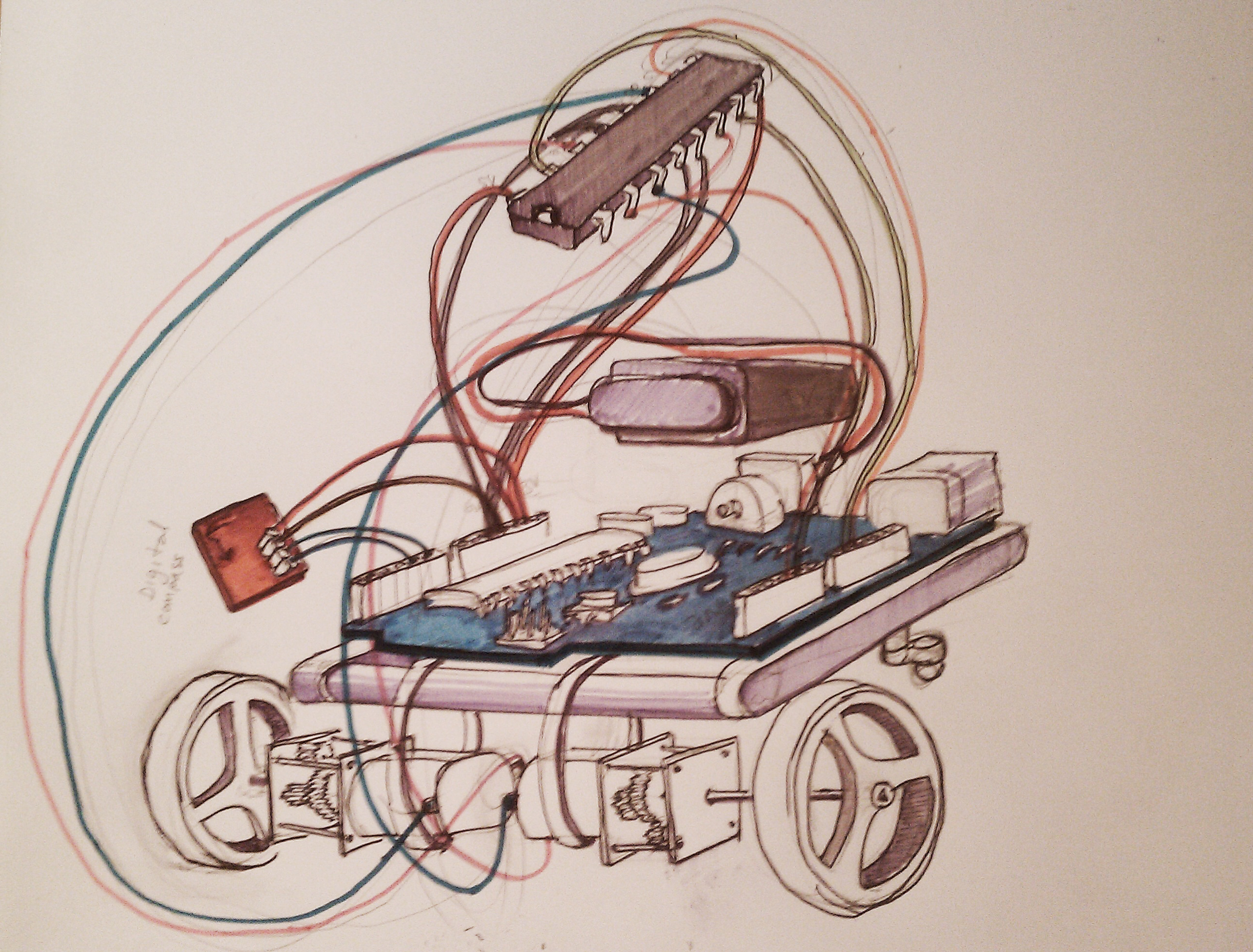
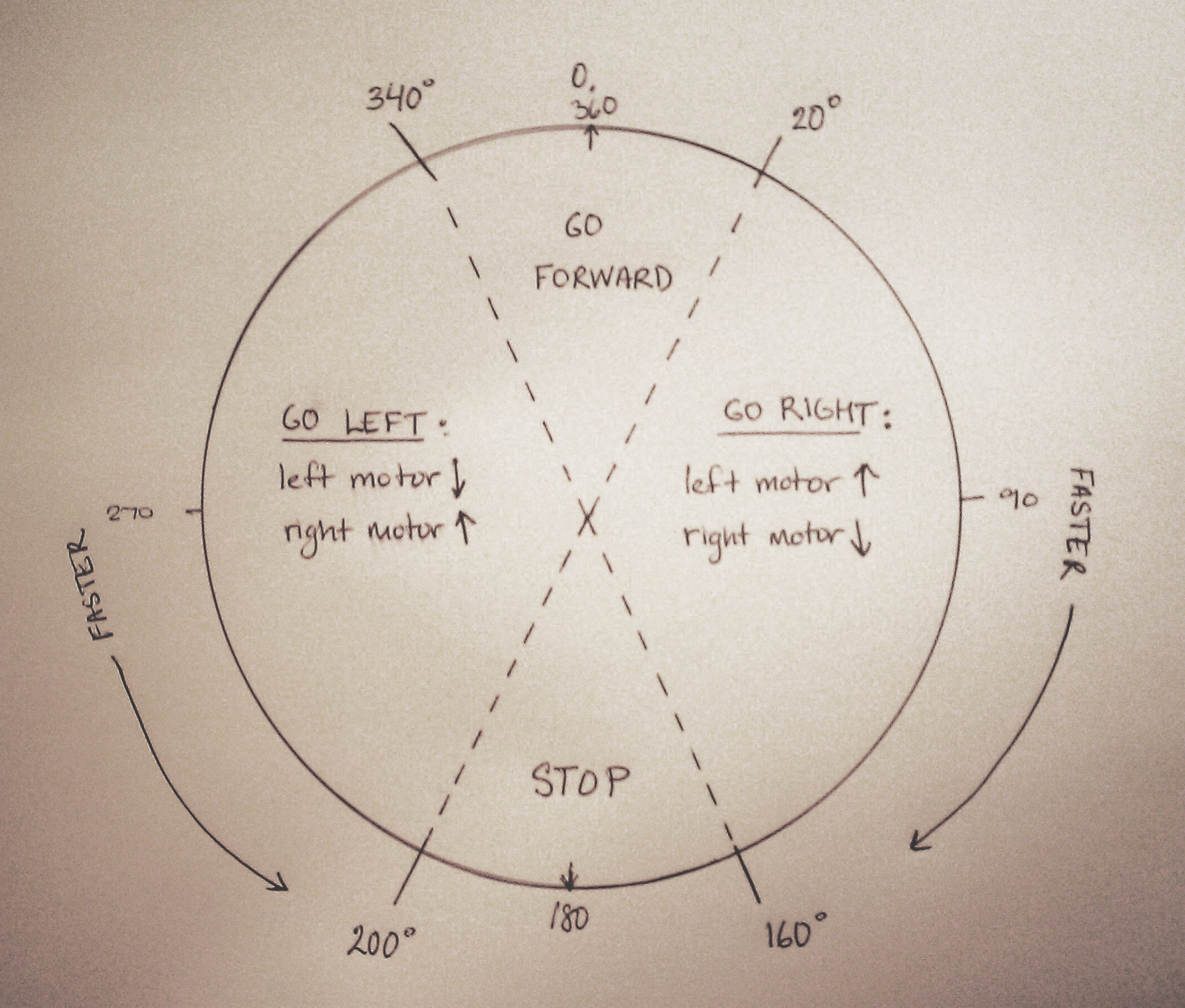
We used a digital compass with tilt compensation, and a very strong magnet to pull the thing along. Two gear head motors were controlled by an arduino sketch that speeded up or reversed one or both motors depending on where the compass was pointing based on the following diagram:

The speed of each motor is determined by mapping between high and low the compass reading’s deviation from 0° .

The two motors, controlled by an HBridge, were rubber banded to the base, topped by the ardino and the battery:

Click the link below to view and download our arduino code.

CompasCode

We tried to hack a Rudolf Raindeer toy to add other movement to the boa, which was our chosen ordinary object to enliven.

It gave the boa a nice vibration and a red LED nose, but our tiny gear head motors could not hold the extra weight, and I gave the raindeer motor too much power, so eventually it left us. It was good while it lasted, and I’m sad we didn’t get a video of it, but it wasn’t meant to be.

The Chikenization of the Cute Arduino

It turned out our little motors couldn’t drag the whole boa, so we gave them just the right amount:

[wpvideo 453EbZcS]

We thought about naming it for a while, and while I was set on Ron, Mira was entertaining Winston, Wilson, Ralph, Carleton, Hector and many others from a google search for stupid names. TBD.

Challenges / Lessons Learned:

– Bigger, more powerful motors.

– IR proximity sensors in an array.

– Better Power management.

– We need to learn how to hack a digital switch.

Fisting

Ready, Set, Axe

Sorry, I don’t know who took the picture above, but I love it. This is the story of the much anticipated, hyper publicized and brutally witnessed demise of team Back Off slash Golden Fist slash Golden Chariot slash Future Yacht or something.

Our team: Noah Waxman, Michael Rosen, Mindy Tchieu, Bobby Genalo, Scott Wayne Indiana, and me.

The objective: to create a vehicle that is powered only at startup, and only within 15 minutes.

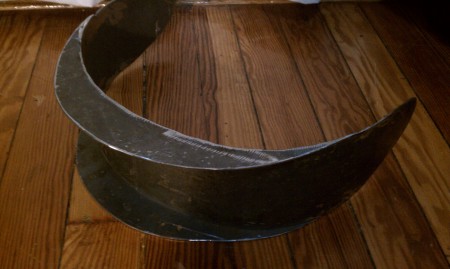
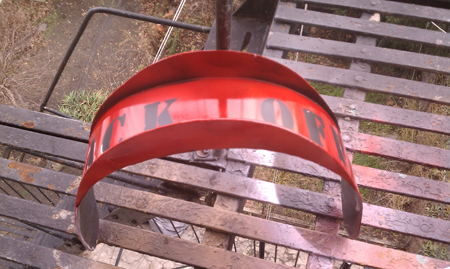
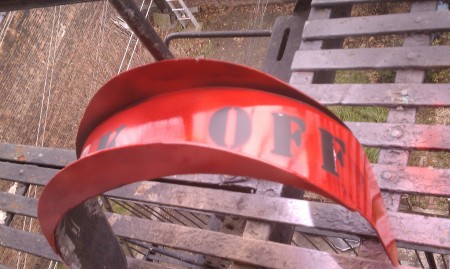
We welded a slingshot chariot from discarded steel parts and bike wheels, and constructed the slingshot from garage springs and 2×4’s. My main contribution was the backplate of the car that edged up against the slingshot and took hours to weld:

steel welded backplate


painted

Scott, Michael, and I transported the car via subway from the Madagascar Institute shop to ITP the day before the race, and it just fit between the two doors. It was a really good conversation starter.

As we were putting finishing touches onto the golden car and assembling the sling shot, somebody was walking by with a broken golden fist from my other favorite project (made with Avery Max, Ju Yun Song, Ali Alexander, and Jack Kalish) which was the Applications class Thumb Awards award ceremony, celebrating mundane online achievements, posts, photographs, and all the one-line jewels of cleverness our classmates share with us through social networking sites. The trophies we gave out were gold painted plaster molds I made of Jack’s hand giving a thumbs up.

Plaster Thumb Award Trophies (before paint) Unfortunately they were made during a few days when there was no break from the rain, so neither the plaster or the gold paint were able to dry, adding to the structural weakness of the protruding thumb.

.
.

As we were finishing the car somebody was walking by with a golden fist less the thumb, and somebody in the group spotted it as the perfect figurehead for our golden chariot. It was so good to see it recycled, and it was just what our chariot needed.

.
.

Alex Kozovski took some amazing photos of the race that can be seen on his flickr page but here are a few of my favorites (click on them to browse):

[slideshow id=1 w=450 h=600]

And the results? We lost . . undeniably. It was sad. But we were featured in this epic ad for the ITP Winter Show after party by Igal Nassima.

.
.

ITP WINTER SHOW AFTER PARTY 2010 from igal nassima on Vimeo.

.
.

The best part of the project, by far, was how so many ITP’ers came out to watch and laugh and cheer us on. They really made it fun for us and I was glad to entertain them with our glorious loss.

.
.

Spring Steel Coil Powered Mechanism

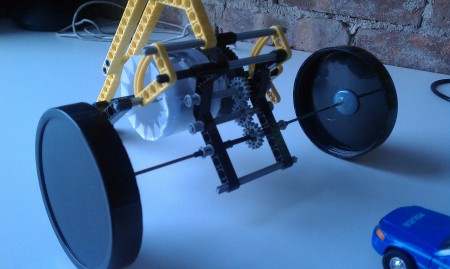
Lego model of spring steel coil powered car

While we were brainstorming on ways to power our car I did some research on using the spring steel coil method of powering a car, where a coil of spring steel is rolled up, and wound tightly, so when released it quickly uncoils, and propels the car forward. This system is frequently used in toy cars that you wind by pulling backwards and then release.

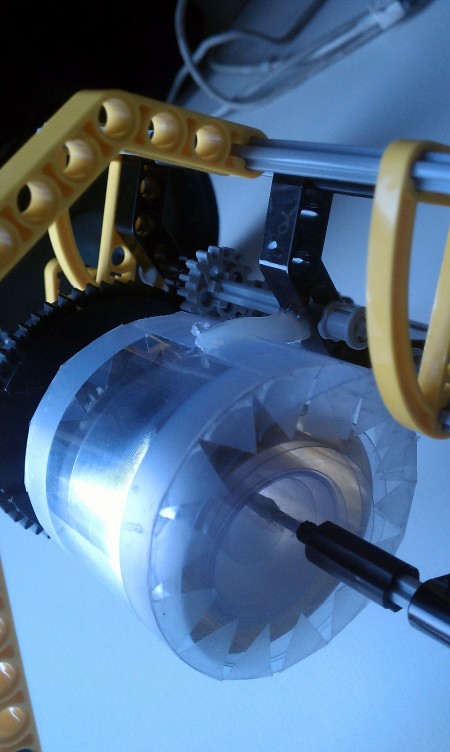
I made this Lego model, simulating the spring steel coil with wound plastic sheet, which although with very little force, also tends to unwind or “spring” out.

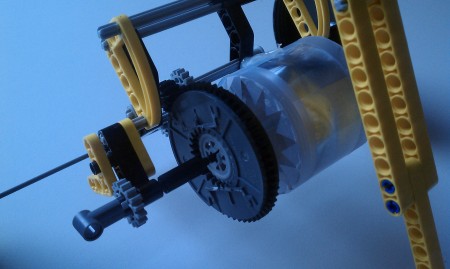
A long and narrow sheet of clear plastic is wound up inside of this cylindrical container, with one end attached to the center shaft, and the other to the outside of the cylinder. One side of the cylinder has a large fixed gear that turns with the cylinder. The shaft is fixed, and when the cylinder is wound around, it tends to spring back to unwind the spring steel, turning the large gear with it, which in turn turns other gears, and eventually the wheels.

When I opened up one of those toy cars, I noticed that one of the most complicated part of the mechanism was the part that switches between gears so that when the wheels are going backward the coil is winding, and when they are going forward it is allowed to unwind. In our case this would not be necessary, since we could wind with some sort of ratchet at the starting line, and then release to propel forward.

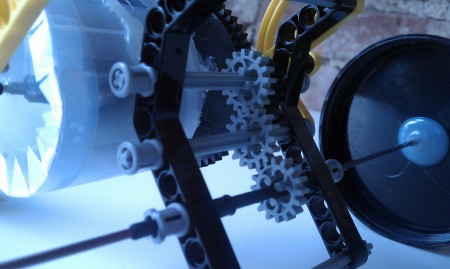
In this image you can kind of see how the main large black gear is turning the top gear, which turns the middle gear, which turns the bottom gear attached to the wheel shaft. The middle gear sits on a shaft, unlike the other shafts, that has the ability to move a little up and down within the lego piece, hence it is a free, not a fixed, gear. When the spring coil is completely unwound, or at any point when the momentum of the wheel shaft is faster than the movement of the coil shaft, the momentum of the wheel shaft begins to turn the middle gear that connects the wheel shaft to the coil shaft, and as soon as this happens, the middle (free) gear moves up with its shaft just enough that it fails to grip to the wheel shaft, which in turn is free to turn with its own momentum.

The left most piece with the small gray gear and the hole is the ratchet, where a pole can be placed inside to help gain leverage to turn the shaft and wind the spring steel. The yellow cog on the left helps to keep the gear from turning the other way and unwinding the coil. After it is wound all the way it can be released to propel the car by lifting the yellow cog.

In the end my team wanted to focus entirely on the slingshot idea, but figuring this out was very educational. The biggest challenge is allowing the car to keep going forward after the spring was completely unwound, like the free gear in a bike that allows the bike to keep going even when you stop pedaling.

Final Project Idea

Mira and I talked about exploring how simple behaviors (movements) can give an object personality.

At first I was thinking about my fantasy device, a bag that follows you around, and how it would inevitably become like a child or pet and would need some simple code of behavior to understand how to follow somebody around.

Mira was interested in animating ordinary things and exploring the emotion or ideas that their behaviors evoke with something like a performance in mind. We also talked about making clothing move.

I keep thinking about the repurposed disposed ikea furniture that Adam Lassy turned into interactive furniture. I saw it at the spring show last year, and I was struck with how much empathy and emotion the Ikea chair evoked while just rolling around the floor.

I stole this video from his website:

[wpvideo Vfta0L2j]

We want to create an animated ordinary object and give it enough behaviors to be able to follow us around, and when engaged, dance with us.

Here are some examples of movement giving something ordinary character from Pixar:

[wpvideo lwArOkb5]

The famous Pixar lamp:

[wpvideo XKzOb0YQ]

I found an animation article by John Lasseter where he talks about animating everyday objects in a way that suggests they have a personality. Animals and people look, think, then act, while objects controlled by something else move unexpectedly. He recommends animating first the eyes, then the head, then the body motion in that sequence to create the illusion that the object is thinking before doing.

It is probably not exactly relevant to what we will do, but it is really interesting.

Here is the text by John Lasseter:


"THE THINKING CHARACTER

When animating characters, every movement, every action must exist for a reason. If a 
character were to move about in a series of unrelated actions, it would seem obvious that 
the animator was moving it, not the character itself. All the movements and actions of a 
character are the result of its thought process. In creating a "thinking character," the 
animator gives life to the character by connecting its actions with a thought process. Walt 
Disney said, "In most instances, the driving forces behind the action is the mood, the 
personality, the attitude of the character—or all three. Therefore, the mind is the pilot. We 
think of things before the body does them."

To convey the idea that the thoughts of a character are driving its actions, a simple trick
is in the anticipation; always lead with the eyes or the head. If the character has eyes, the 
eyes should move first, locking the focus of its action a few frames before the head. The 
head should move next, followed a few frames later by his body and the main action. The 
eyes of a character are the windows to its thoughts; the character’s thoughts are conveyed 
throught the actions of its eyes.

If the character has no eyes, such as an inanimate object like a Luxo lamp, it is even more 
important to lead with the head. The number of frames to lead the eyes and head depends 
on how much thought precedes the main action. The animator must first understand a 
character’s thought process for any given action. Consider a character wanting to snatch 
some cheese from a mouse trap; the eyes will lead the snatch by quite a bit because this is 
a big decision. The character needs time to think, "...Hmm...This looks tricky, is this 
cheese really worth it or is it just processed American cheese food?...Oh what the heck...," 
he decides, and snatches the cheese.

Conversely, if the action is a character ducking to miss a low flying sheep, the anticipation 
of the eyes leading the action should be just a couple of frames. "What the...," and the next 
thing, he is spitting wool out of his mouth.

The only time that the eyes or head would not lead the action would be when an external 
force is driving the character’s movements, as opposed to his thought process. For 
example, if that character was hit in the back by the low flying sheep, the force of the 
impact would cause the body to move first, snapping the head back and dragging it behind 
the main action of the body.

EMOTION

The personality of a character is conveyed through emotion and emotion is the best indicator 
as to how fast an action should be. A character would not do a particular action the same way 
in two different emotional states. When a character is happy, the timing of his movements 
will be faster. Conversely, when sadness is upon the character, the movements will be slower. 
An example of this, in Luxo Jr., is the action of Jr. hopping. When he is chasing the ball, he is 
very excited and happy with all his thoughts on the ball. His head is up looking at the ball, the 
timing of his hops are fast as there is very little time spent on the ground between hops 
because he can’t wait to get to the ball.

After he pops the ball, however, his hop changes drastically, reflecting his sadness that the object 
of all his thoughts and energy just a moment ago is now dead. As he hops off, his head is down, 
the timing of each hop is slower, with much more time on the ground between hops. Before, he 
had a direction and a purpose to his hop. Now he is just hopping off to nowhere. 1

To make a character’s personality seem real to an audience, he must be different than the other 
characters on the screen. A simple way to distinguish the personalities of your characters is 
through contrast of movement. No two characters would do the same action in the same way. 
For example, in Luxo Jr., both Dad and Jr. bat the ball with their heads. Yet Dad, who is larger 
and older, leans over the ball and uses only his shade to bat it. Jr., however, is smaller, younger, 
and full of energy, he whacks the ball with his whole shade, putting his whole body into it. 1"


Some ideas we discussed/thought about are a hat, a cup, pants, a bag, an amorphous blob.

I made this collage, and I’m only putting it here as a warning to the world, that unless it is animated nicely or given nice movements, an object isn’t necessarily going to have personality.

[wpvideo XiwWVPCM]

Movement we are into:

waves, as in Reuben Margolin sculpture.

[wpvideo suePJAYc]

[wpvideo SuuMEvJ3]

Technical Difficulties:

It seemed easy but a bit of research revealed that making a robot follow you is not (easy). One robot I read about had camera tracking, sonar range finders, GPS, and GIS. It was an assistive robot for the visually impaired, so it had to be very accurate and adaptive, but reading about the complexity of making a computer see or hear is sad to me.

One solution I found was to take the processing of vision/senses out of the robot and equip it with laser rang finders and RFID sensors responding to rfid information in the environment. This requires creating a readable environment, but is an interesting solution to the problem.

Another robot was responsive to sound, by triangulating the origin of the sound based on three microphones. This would work well with our whistling idea. It seems doable except for the microphone hardware, but these people did it: The people that did it.

Tracking the  the robot’s position, the robot’s destination, determining the robot’s motion control, and if/ that it can read its environment are all issues that can require different systems. In our instance, I think we can eliminate most of these issues, because its position and destination can be relative to the person, and it doesn’t need to know its environment, because its completely dependent on the person. It can sense the person using an RFID tag and a proximity detector.

If RFID sensors can give the distance from the tag, then its perfect. The person can wear the tag and remain in contact (within a certain distance) with the robot. I found one example that used something similar to triangulation to determine the direction of the RFID reading: A self-contained direction sensing radio frequency identification (RFID) reader is developed employing a dual-di- rectional antenna for automated target acquisition and docking of a mobile robot in indoor environments.”

If the RFID sensors only say they detect a certain tag, which would usually be the case, then another way may be to also have a proximity sensor or several angled ones, that are consulted for the closest object only when an RFID tag is detected by the RFID sensor, identifying the closest object as the person. The proximity then determines if the thing goes in that direction faster, slower, etc.  Another way may be to have several RFID sensors with different ranges so if a tag is detected in one and not the other the thing can be told to slow down or speed up based on knowing that it needs to be in the range of the middle RFID reader (for example).

Conclusion:

I’m really interested in giving things life and making them dance, but I have understood that it can be really difficult, so I am open to other applications of this idea of animating ordinary things. But I am still interested and willing to work on it.

Transistor Lab

I used a 5V regulator to regulate the 9V going into the motor, and then I thought that I could power the arduino with that same 5V, and it worked! I was able to unplug it from the computer.

But doesn’t this defeat the purpose of using an external (to arduino) power supply? Was the motor needing more than 5V?

[wpvideo LTPVMetJ]

Media Controller 3

To get back to the call and response issue, I want to resolve it for future reference, and I think I may have found the issue: a misplaced ‘}’. Here is the arduino code:

int analogOne = 0; // analog input int analogTwo = 1; int analogThree = 2; int analogFour=3; int analogFive=4; int analogSix=5; int digitalOne = 2; // digital input int sensorValue = 0; // reading from the sensor void setup() { // configure the serial connection: Serial.begin(9600); // configure the digital input: pinMode(digitalOne, INPUT); establishContact(); } void loop() { if(Serial.available()>0){ int inByte=Serial.read(); sensorValue = analogRead(analogOne); Serial.print(sensorValue, DEC); Serial.print(“,”); sensorValue = analogRead(analogTwo); Serial.print(sensorValue, DEC); Serial.print(“,”); sensorValue = analogRead(analogThree); Serial.print(sensorValue, DEC); Serial.print(“,”); sensorValue = analogRead(analogFour); Serial.print(sensorValue, DEC); Serial.print(“,”); sensorValue = analogRead(analogFive); Serial.print(sensorValue, DEC); Serial.print(“,”); sensorValue = analogRead(analogSix); Serial.print(sensorValue, DEC); Serial.print(“,”); sensorValue = digitalRead(digitalOne); // print the last sensor value with a println() Serial.println(sensorValue, DEC); } } void establishContact(){ while(Serial.available()<=0){ Serial.println(“hello”); delay(300); } }
And this processing sketch takes the serial input, prints the values of the sensors, and changes the color of the background based on the first three sonsors.
boolean firstContact=false;

import processing.serial.*;
Serial myPort;                  

PFont f;

float sensor1=200;
float sensor2=0;
float sensor3=60;
float sensor4=0;
float sensor5=0;
float sensor6=0;
float sensor7=0;

void setup() {

  size(900,480);
  f=createFont("Arial",16,true);
  println(Serial.list());

  myPort = new Serial(this, Serial.list()[0], 9600);
  myPort.bufferUntil('\n');
}

void serialEvent(Serial myPort) { 

  String myString = myPort.readStringUntil('\n');
  if (myString != null) {
     myString = trim(myString);

    if(firstContact==false){
      if(myString.equals("hello")){
        myPort.clear();
        firstContact=true;
        myPort.write('A');
      }
    }
    else{
    int sensors[] = int(split(myString, ','));
    for (int sensorNum = 0; sensorNum < sensors.length; 
      sensorNum++) {
      print("Sensor " + sensorNum + ": " +
             sensors[sensorNum] + "\t");
      println();
      if (sensors.length > 1) {
        sensor1 =map(sensors[0],0,1000,0,255);
        sensor2 = map(sensors[1],250,500,0,255);
        sensor3= map(sensors[2],250,500,0,255);
        sensor4=sensors[3];
        sensor5=sensors[4];
        sensor6=sensors[5];
        sensor7=sensors[6];
        if(sensors[3]==1){
          sensor2=sensor2/2;
          }
        }
       }
    }
    myPort.write('A');
}
}

void draw() {
  background(sensor1,sensor2,sensor3);
  textFont(f);
  fill(0);
  textAlign(LEFT);
  text("sensor1: " + sensor1 +
       "   sensor2: " + sensor2 +
       "   sensor3: " + sensor3 +
       "   sensor4: " + sensor4 +
       "   sensor5: " + sensor5 +
       "   sensor6: " + sensor6 +
       "   switch: "  + sensor7, width/10, height/4);
}

And now the two put together with the video code:

/* This code reads 6 analog sensors and one digital switch to
control background color, alpha, and speed of a video based
on the sensor readings. Video is switched when sensor 4 is >
400, background is dependent on the first three sensors,
movieAlpha, or transparency, is dependent on sensor5, and
the rate on sensor6. The switch is set up to change the
readings of the sensors in the if statement, but isn't
doing much in this version
*/ 

import processing.serial.*;
Serial myPort;
boolean firstContact=false;
import jmcvideo.*;
import processing.opengl.*;
import javax.media.opengl.*; 

int sensor1;
int sensor2=0;
int sensor3=0;
int sensor4;
int sensor5=0;
int sensor6;
int sensor7=0;
float movieRate=0;
float movieAlpha=0;

JMCMovieGL myMovie;
int pvw, pvh;
String[] vids = new String[]{"static.mov","sledding.mov",
               "slide.mov","californiadreams.mov",
            "commercials.mov", "gummibears.mov","wwf.mov"};
int vidNum = 0;

void setup() {
  size(800,600, OPENGL);
  frame.setResizable(true);
  background(0);

  myMovie = movieFromDataPath(vids[vidNum]);
  myMovie.loop();

  println(Serial.list());
  myPort = new Serial(this, Serial.list()[0], 9600);
  myPort.bufferUntil('\n');

}

void serialEvent(Serial myPort) { 

  String myString = myPort.readStringUntil('\n');

  // if you got any bytes other than the linefeed:
  if (myString != null) {

    myString = trim(myString);

    if(firstContact==false){
      if(myString.equals("hello")){
        myPort.clear();
        firstContact=true;
        myPort.write('A');
        }
     }
    else{
       int sensors[] = int(split(myString, ','));

    // print out the values you got:
       for (int sensorNum = 0; sensorNum < sensors.length;
            sensorNum++) {
       print("Sensor " + sensorNum + ": " + sensors[sensorNum]
              + "\t");
       println();
       if (sensors.length > 1) {
          sensor1=sensors[0];
          sensor2=sensors[1];
          sensor3=sensors[2];
          sensor4=sensors[3];
          sensor5=sensors[4];
          sensor6=sensors[5];
          sensor7=sensors[6];
          if(sensors[3]==1){
             sensor2=sensor2/2;
             }
          }
       }
    }
    myPort.write('A');
}
}

void draw()
{
   background(map(sensor2,0,1000,0,255),
                  map(sensor3,250,500,0,255),
                  map(sensor5,100,900,0,255));  

  PGraphicsOpenGL pgl = (PGraphicsOpenGL) g;

  GL gl = pgl.beginGL();
  {
    if (pvw != width || pvh != height)
    {
      background(0);
      gl.glViewport(0, 0, width, height);
      pvw = width;
      pvh = height;
    }
    movieAlpha=map(sensor5,0,900,255,1);
    myMovie.centerImage(gl);
    myMovie.alpha=(1f*movieAlpha/255f);
    movieRate=map(sensor6,0,1000,.2,2);
    myMovie.setRate(movieRate);
  }
  pgl.endGL();

 if(sensor4>700){
   vidNum = (vidNum + 1) % vids.length;
   myMovie.switchVideo(vids[vidNum]); }else{
   myMovie.loop();}
}  

JMCMovieGL movieFromDataPath(String filename)
{
  return new JMCMovieGL(this, filename, RGB);
}

And it works !!!!!!

Media Controller

The code finally worked at 1 am. I had tried several different ways of merging the movie manipulation code with the call and response method that was working with simple color manipulation with all of the sensors, but something was going wrong. I will try again, but the standard serial communication worked fine after a few attempts. There is a tint effect based on 3 flex sensors and one fsr controlling tint strength, a speed change based on another fsr, a video/channel switch also from another fsr, which happens when that one reaches a value above 700. Here is the Processing code:

import processing.serial.*;
Serial myPort;
import jmcvideo.*;
import processing.opengl.*;
import javax.media.opengl.*; 

int sensor1;
int sensor2=0;
int sensor3=0;
int sensor4;
int sensor5=0;
int sensor6;
int vidNum = 0;
float movieRate=0;
float movieAlpha=0;

JMCMovieGL myMovie;//from JMC example, load movie string
int pvw, pvh;
String[] vids = new String[]{"static.mov","sledding.mov",
    "slide.mov","californiadreams.mov", "commercials.mov",
    "gummibears.mov","wwf.mov"};

void setup() {
  size(800,600, OPENGL);
  frame.setResizable(true);
  background(0);

  myMovie = movieFromDataPath(vids[vidNum]);
  myMovie.loop();

  println(Serial.list());//establish serial comm.
  myPort = new Serial(this, Serial.list()[0], 9600);
  //read bytes into a buffer until you get a linefeed:
  myPort.bufferUntil('\n');
}

void draw()
{  //background based on 3 sensor values:
   background(map(sensor2,0,1000,0,255),
                  map(sensor3,250,500,0,255),
                  map(sensor5,100,900,0,255));  

  //draw the movie:
  PGraphicsOpenGL pgl = (PGraphicsOpenGL) g;

  GL gl = pgl.beginGL();
  {
    if (pvw != width || pvh != height)
    {
      background(0);
      gl.glViewport(0, 0, width, height);
      pvw = width;
      pvh = height;
    }
    //change the transparency based on sensor4:
    movieAlpha=map(sensor4,0,900,255,1);
    myMovie.centerImage(gl);
    myMovie.alpha=(1f*movieAlpha/255f);
    //change the movie rate based on sensor1:
    movieRate=map(sensor1,0,1000,.2,2);
    myMovie.setRate(movieRate);
  }
  pgl.endGL();

 //switch video when sensor 4 is on high:
 if(sensor4>700){
   vidNum = (vidNum + 1) % vids.length;
   myMovie.switchVideo(vids[vidNum]); }else{
   myMovie.loop();}
}  

//get sensor values from serial port:
void serialEvent(Serial myPort) { 

  String myString = myPort.readStringUntil('\n');
  // if you got any bytes other than the linefeed:
  if (myString != null) {

    myString = trim(myString);

    // split the string at the commas
    // and convert the sections into integers:
    int sensors[] = int(split(myString, ','));

    // print out the values you got:
    for (int sensorNum = 0; sensorNum < sensors.length;
          sensorNum++) {
      print("Sensor " + sensorNum + ": " +
              sensors[sensorNum] + "\t");
    }

    // add a linefeed after all the sensor values are printed:
    println();
    if (sensors.length > 1) {
        sensor1=sensors[0];
        sensor2=sensors[1];
        sensor3=sensors[2];
        sensor4=sensors[3];
        sensor5=sensors[4];
        sensor6=sensors[5];
     }
    }
}

JMCMovieGL movieFromDataPath(String filename)
{
  return new JMCMovieGL(this, filename, RGB);
}
And the Arduino code:
int analogOne = 0;       // analog input
 int analogTwo = 1;       // analog input
 int analogThree = 2;
  int analogFour=3;
 int analogFive=4;
 int analogSix=5;
 int digitalOne = 2;
 int sensorValue = 0;     // reading from the sensor

 void setup() {
   // configure the serial connection:
   Serial.begin(9600);
   // configure the digital input:
   pinMode(digitalOne, INPUT);

 }

 void loop() {

   // read the sensor:
   sensorValue = analogRead(analogOne);
   // print the results:
   Serial.print(sensorValue, DEC);
   Serial.print(",");

   // read the sensor:
   sensorValue = analogRead(analogTwo);
   // print the results:
   Serial.print(sensorValue, DEC);
   Serial.print(",");

   // read the sensor:
   sensorValue = analogRead(analogThree);
   // print the results:
   Serial.print(sensorValue, DEC);
   Serial.print(",");

   sensorValue = analogRead(analogFour);
   Serial.print(sensorValue, DEC);
   Serial.print(",");

   sensorValue = analogRead(analogFive);
   Serial.print(sensorValue, DEC);
   Serial.print(",");

   sensorValue = analogRead(analogSix);
   Serial.print(sensorValue, DEC);
   Serial.print(",");

   //sensorValue = digitalRead(digitalOne);
   // print the last sensor value with a println()
   Serial.println(sensorValue, DEC);
 }
Hanny and Kate built a projection TV from cardboard, tape, and a sheet of plastic for rear projection, that sets a very particular mood for the soft plushy controller, which has turned into a pillow.

.
.

[wpvideo 9c4vWYox]

.
.

.
.

.
.


The physical Part :

I began by making the sensors we were interested in using talk to the computer. We had ordered some sensors we wanted to play with: flex sensors, a larger force sensing resistor, accelerometers, light sensors, and a proximity sensor.

I wired the sensors so that we have their output ranges, and their circuit needs, and a general serial communication code. Based on the last lab, I wired them and read them as an array in processing, but this time using the call and response method to foresee any issues with delay because of the media processing.

They are wired in this order:

0. long force sensing resistor

1. flex sensing resistor

2. flex sensing resistor

3. accelerometer

4. ambient light sensor

5. infrared proximity sensor

digital 2. switch

Arduino sketch for 6 analog inputs and one switch:

int analogOne = 0;       // analog input
 int analogTwo = 1;
 int analogThree = 2;
 int analogFour=3;
 int analogFive=4;
 int analogSix=5;
 int digitalOne = 2;      // digital input
int sensorValue = 0;     // reading from the sensor
void setup() {
Serial.begin(9600);
pinMode(digitalOne, INPUT);
establishContact();
}
void loop() { if(Serial.available()>0){ int inByte=Serial.read(); sensorValue = analogRead(analogOne); Serial.print(sensorValue, DEC); Serial.print(“,”); sensorValue = analogRead(analogTwo); Serial.print(sensorValue, DEC); Serial.print(“,”); sensorValue = analogRead(analogThree); Serial.print(sensorValue, DEC); Serial.print(“,”); sensorValue = analogRead(analogFour); Serial.print(sensorValue, DEC); Serial.print(“,”); sensorValue = analogRead(analogFive); Serial.print(sensorValue, DEC); Serial.print(“,”); sensorValue = analogRead(analogSix); Serial.print(sensorValue, DEC); Serial.print(“,”); sensorValue = digitalRead(digitalOne); // print the last sensor value with a println() Serial.println(sensorValue, DEC); } } void establishContact(){ while(Serial.available()<=0){ Serial.println(“hello”); delay(300); } }

And the processing sketch receiving 7 variables, still just using a few of the readings to move the ball from the lab, but we will transform this sensor to variable output to control our media.

boolean firstContact=false;

import processing.serial.*;
Serial myPort;                  

PFont f;

float bgcolor;
float fgcolorR,fgcolorG,fgcolorB;
float xpos, ypos;		             

void setup() {

  size(800,480);
  f=createFont("Arial",16,true);
  println(Serial.list());

  myPort = new Serial(this, Serial.list()[0], 9600);
  myPort.bufferUntil('\n');
}

void serialEvent(Serial myPort) { 

  String myString = myPort.readStringUntil('\n');
  if (myString != null) {
     myString = trim(myString);

    if(firstContact==false){
      if(myString.equals("hello")){
        myPort.clear();
        firstContact=true;
        myPort.write('A');
      }
    }
    else{
    int sensors[] = int(split(myString, ','));
    for (int sensorNum = 0; sensorNum < sensors.length;
         sensorNum++) {
      print("Sensor " + sensorNum + ": " +
             sensors[sensorNum] + "\t"); 

   background(203,0,57);
  textFont(f);
  fill(0);
  textAlign(LEFT);
  text("sensor1: " + sensors[0] + "   sensor2: "+
        sensors[1] +"   sensor3: " +sensors[2]+
        "   sensor4: " +sensors[3]+ "   sensor5: " +
        sensors[4]+ "   sensor6:"+sensors[5]+
        "   switch: " +sensors[6], width/10, height/4);

    }
    println();
    }
    myPort.write('A');
}
}
void draw() {}

Media Controller tech

We decided to make a squishy soft video/audio controller.

I began by making the sensors we were interested in using talk to the computer. We had ordered some sensors we wanted to play with: flex sensors, a larger force sensing resistor, accelerometers, light sensors, and a proximity sensor.

I wired the sensors so that we have their output ranges, and their circuit needs, and a general serial communication code. Based on the last lab, I wired them and read them as an array in processing, but this time using the call and response method to foresee any issues with delay because of the media processing.

They are wired in this order:

0. long force sensing resistor

1. flex sensing resistor

2. flex sensing resistor

3. accelerometer

4. ambient light sensor

5. infrared proximity sensor

digital 2. switch

Arduino sketch for 6 analog inputs and one switch:

int analogOne = 0;       // analog input
 int analogTwo = 1;
 int analogThree = 2;
 int analogFour=3;
 int analogFive=4;
 int analogSix=5;
 int digitalOne = 2;      // digital input
int sensorValue = 0;     // reading from the sensor
void setup() {
Serial.begin(9600);
pinMode(digitalOne, INPUT);
establishContact();
}
void loop() { if(Serial.available()>0){ int inByte=Serial.read(); sensorValue = analogRead(analogOne); Serial.print(sensorValue, DEC); Serial.print(“,”); sensorValue = analogRead(analogTwo); Serial.print(sensorValue, DEC); Serial.print(“,”); sensorValue = analogRead(analogThree); Serial.print(sensorValue, DEC); Serial.print(“,”); sensorValue = analogRead(analogFour); Serial.print(sensorValue, DEC); Serial.print(“,”); sensorValue = analogRead(analogFive); Serial.print(sensorValue, DEC); Serial.print(“,”); sensorValue = analogRead(analogSix); Serial.print(sensorValue, DEC); Serial.print(“,”); sensorValue = digitalRead(digitalOne); // print the last sensor value with a println() Serial.println(sensorValue, DEC); } } void establishContact(){ while(Serial.available()<=0){ Serial.println(“hello”); delay(300); } }

And the processing sketch receiving 7 variables, still just using a few of the readings to move the ball from the lab, but we will transform this sensor to variable output to control our media.

boolean firstContact=false;

import processing.serial.*;
Serial myPort;                  

PFont f;

float bgcolor;
float fgcolorR,fgcolorG,fgcolorB;
float xpos, ypos;		             

void setup() {

  size(800,480);
  f=createFont("Arial",16,true);
  println(Serial.list());

  myPort = new Serial(this, Serial.list()[0], 9600);
  myPort.bufferUntil('\n');
}

void serialEvent(Serial myPort) { 

  String myString = myPort.readStringUntil('\n');
  if (myString != null) {
     myString = trim(myString);

    if(firstContact==false){
      if(myString.equals("hello")){
        myPort.clear();
        firstContact=true;
        myPort.write('A');
      }
    }
    else{
    int sensors[] = int(split(myString, ','));
    for (int sensorNum = 0; sensorNum < sensors.length;
         sensorNum++) {
      print("Sensor " + sensorNum + ": " +
             sensors[sensorNum] + "\t"); 

   background(203,0,57);
  textFont(f);
  fill(0);
  textAlign(LEFT);
  text("sensor1: " + sensors[0] + "   sensor2: "+
        sensors[1] +"   sensor3: " +sensors[2]+
        "   sensor4: " +sensors[3]+ "   sensor5: " +
        sensors[4]+ "   sensor6:"+sensors[5]+
        "   switch: " +sensors[6], width/10, height/4);

    }
    println();
    }
    myPort.write('A');
}
}
void draw() {}

Shade Powered Tape Player

Our assignment was to apply a reversed dc permanent magnet motor generator to something, so to create something you can manually power.

I decided to use a roll up shade. In our classroom there are very large shades that are open and closed by pulling on a circular chain. Therefore the power is transferred from the spinning rod to the vertical chain going up and down, which means that by a simple pull of the chain the rod will spin very quickly.

I used a tape player, because in the play position it is always on. It is really easy to make a tape player play and stop by adding and removing power. With the curtain I was able to produce just the right amount of power, so that while the curtain was being taken up or lowered, Let it Be would play.

Probably the most interesting thing I learned in this class is that a motor is a generator in reverse. For example, a DC permanent magnet motor turns as a result of permanent magnets repelling and attracting the router coil – an electromagnet created by winding a powered coil around a piece of metal and infusing it with the energy of the battery. If you reverse the poles of the battery the motor will spin in the opposite direction.

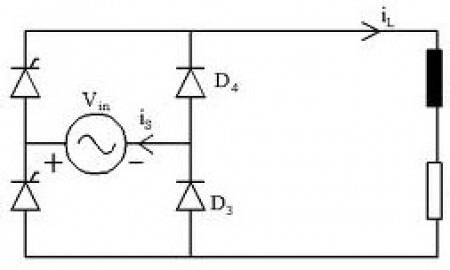
If you were to take the motor and spin the part that is generally spinning, the reaction happens in reverse, and power is released through the wires usually going to a battery. Reversing the direction of the spin switches the poles (negative/positive). If you are powering something and you want it to work when the motor spins in either direction, as was the case in my project, you would want to include a bridge rectifier, also used to convert ac to dc power, to redirect the current and keeps it flowing in one direction.

Bridge Rectifier

electric motors

electromagnets